The main feature of the Basic view are the three microphone positions Close, Player, and Distant . For the Close position, the microphones were positioned near the strings, giving an "inside" sound with little ambience. Player of course sounds as if you were sitting right in front of the instrument, while Distant was recorded from the audience’s listening position and therefore has the most ambience. By clicking on one of the position buttons to load the respective sample set, you’re practically ready to play – if you’re not yet connected to your master keyboard’s MIDI port, you can use the User Interface’s virtual keyboard to test it.
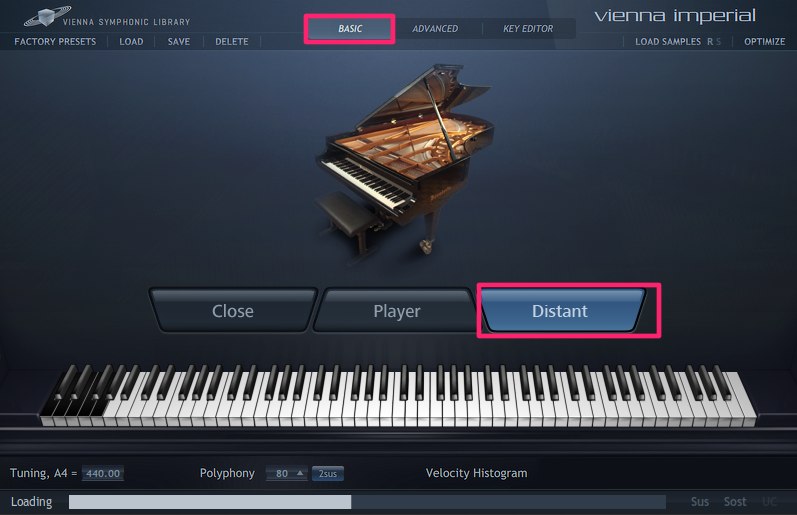
In the button bar above the piano window, you can call up Factory Presets which offer you a variety of reverb settings and sound possibilities our sound engineers have prepared for you. Here you can also load, save, and delete your own custom presets for your preferred configurations. Here’s a list of the currently available Factory Presets:
- 00 Empty: Unloads samples and resets everything to default values
- 01/02/03 Close/Player/Distant Position Default : All parameters set to default values, no reverb added
- 04 Distant Concert Piano Big Hall: Distant position, EQ, reverb: Large Hall, dynamic range and stereo width adapted
- 05 Distant Concert Piano Small Hall: Distant position, EQ, reverb: Small Hall, dynamic range and stereo width adapted
- 06 Ballad Piano: Player position, EQ softens high frequencies, reverb: Large Hall
- 07 Jazz Piano: Player position, EQ, reverb: Small Hall, dynamic range and stereo width adapted
- 08 Dry Rock Piano: Close position, EQ accentuates high and bass frequencies, dynamic range adapted, reverb: Medium Hall
- 09 Melancholy Piano: Close position, EQ softens middle frequencies, reverb: Large Hall, dynamic range adapted
- 10 Soft Lounge Piano: Player position, EQ softens high frequencies, reverb: Medium Hall, dynamic range adapted
- 11 Loudness Piano: Close position, strong EQ, reverb: Medium Hall, dynamic range adapted
- 12 Mysterious Piano: Distant position, strong EQ, reverb: Large Hall, dynamic range adapted
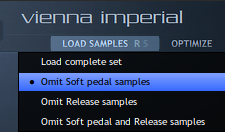
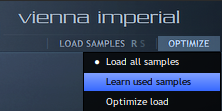
The Optimize function next to Load Samples can help you to save lots of RAM by unloading samples that are not needed in a piece. If you click on "Learn used samples" and play back your piano score, the software will take note of all the samples used. By clicking on "Optimize load" after that, unused samples will be removed from memory. And if you’ve added new material to your score you can click on "Load all samples" to make sure that the piano will play everything again.
Important
If streaming drop-outs occurred during playback, it may happen that Learn Samples doesn’t recognize some of the samples which are in use. If you are in doubt, we recommend bouncing the track (making a mixdown) – since bouncing is a non-realtime process, the sequencer will wait for everything to be streamed properly, so that all samples are guaranteed to be included in the mixdown.
The button bar below the piano window gives you access to the piano’s Tuning between 436 and 444.99 Hz and its Polyphony (40 to 384 voices) which may be necessary to adjust depending on your computer setup. Of course, the Vienna Imperial is equipped with an intelligent note-stealing function so that you will hardly hear any omissions even with less voices. For "normal" application, a setting between 80 and 160 voices should work fine.
The 2sus Feature increases the realism of sustained notes that are pressed before the sustain pedal is activated. This option is switched off by default, as it halves the streaming performance and reduces effective polyphony to half its setting value. Remember these possible restrictions when activating 2sus.

The Velocity Histogram shows the received velocity of every key you play on your keyboard – a nice way to monitor your playing. It is also a very helpful tool to find the right velocity curve for your master keyboard, as the visual feedback allows intuitive settings. MIDI Sensitivity, too, is taken into consideration in the Velocity Histogram. Moreover, you can freeze/unfreeze the Velocity Histogram by double-clicking into the histogram display so that you can get a general image of your playing dynamics.
Below the Velocity Histogram you can see three entries which display the state of the piano pedals. Sus lights up when the sustain pedal is depressed. Sost lights up when you depress the sostenuto pedal, which holds only the notes that were playing when you depressed it. If you keep the sostenuto pedal depressed and hit a note that was held a second time, it will be held again. UC is synonymous for the soft pedal –short for una corda (one string) –, and is greyed out when you choose to omit the soft pedal samples. If active, depressing the soft pedal will switch to playing these samples: a real piano has up to three strings per note, and the soft pedal shifts the piano’s hammer positions so that not all of the strings belonging to a note will be struck. So, if the soft pedal samples are active, UC will reflect the state of the soft pedal.
The location your custom presets are saved in:
- Windows Vista and higher:
%appdata%\Vienna Imperial Presets
- Windows XP:
C:\Documents and Settings\<UserName>\Application Data
- MacOS:
Macintosh HD\Shared Items\Vienna Imperial Presets
Important
Please note: on a 64-bit system it is possible to open two instances of Vienna Imperial in your sequencer; however, we do not recommend mixing two positions playing the same piece – the samples of each position already are a mix of several miking positions, and mixing them with each other might lead to phasing problems.